
Help Centre - Printing Guides & Support
Stuck? Don't worry,
you're not the first.
Whether it's bleed lines, CMYK confusion, or a missing parcel, we've got answers. Let's get you Apprintable-ready.
Frequently Asked Questions
We've answered the big ones
Pick a category below and find the answers you need.
No hold music required.
Bleed is the extra area of your artwork that extends beyond the final cut line. When our printers cut your job to size, there's a small margin of variance. Bleed ensures your background colour or image reaches the very edge of the finished product with no white borders showing up uninvited. We require a minimum of 3 mm bleed on all four sides.
Always supply artwork in CMYK for print. RGB is designed for screens and contains colours that physically cannot be reproduced in ink. Converting at press time can cause unexpected colour shifts. If your file is in RGB we'll do our best to convert it, but we can't guarantee an exact match. Convert to CMYK before uploading for the most accurate result.
We require a minimum of 300 dpi (dots per inch) at the finished print size. Anything lower will appear blurry or pixelated in print, even if it looks sharp on screen. Screen resolution is typically 72-96 dpi, so always work at 300 dpi in your design software from the start rather than upscaling later.
Safe margins (or a "safe zone") are the inner area where all your important content - things like text, logos, and key imagery - should sit. We recommend keeping everything at least 3 mm inside the final trim edge. This protects your content from being accidentally clipped during cutting. Think of it as your comfort blanket against the guillotine.
Yes! If you don't have artwork ready, our in-house design team can help. Whether you need a simple layout or a full brand creation, get in touch and we'll put together a quote. Alternatively, try our free online Designer Studio. It has templates, fonts, and design tools built right in to help you create something print-ready yourself.
Standard production and delivery times vary by product, but most orders are dispatched within 2-5 working days after artwork approval. Express options are available at checkout for select products. Lead times are displayed on each product page before you order. Always check these if you have a deadline.
Sometimes things happen that are beyond our control - extreme weather, strikes, that sort of thing. If that affects your delivery, we'll let you know as quickly as possible. Our Terms & Conditions cover the full force majeure detail.
Yes, collection is available from our premises. Our opening hours are Monday to Friday, 8am - 6pm. Please select "Click & Collect" at checkout and wait for your order-ready notification before coming in - we'd hate for you to make the trip for nothing.
Changes can be made before your artwork is sent to press. Once production has started, we're unable to make amendments. Contact us as soon as possible via our Contact page or live chat and we'll do everything we can to help. The sooner you reach out, the better your chances.
We ship with a selection of trusted couriers depending on parcel size, weight, and destination, including DPD, Royal Mail, and DHL. Tracking information is sent to your email once your order has been dispatched.
Yes! We offer free standard shipping on qualifying orders. The threshold is displayed at checkout. For smaller orders or express services, a delivery charge will be calculated and shown before you confirm your purchase.
We deliver throughout the United Kingdom. International delivery may be available for certain products - contact us before ordering to confirm availability, lead times, and any applicable customs duties for your destination.
Click Login/Register at the top of the page, or head to the Registration page, and fill in your details. Once you've submitted the form, we'll send a verification email, so just click the link inside to activate your account. Having an account makes life easier too, as you can track your orders, save delivery addresses, and reorder your favourites in just a few clicks.
Log into your account, navigate to Account Settings > Security, and click "Change Password". You'll need to enter your current password followed by your new one. If you've forgotten your password, use the "Forgot Password" link on the sign-in page to reset it via email.
We're sad to see you go! To delete your account, head to Account Settings > Privacy and select "Delete Account". Please note this action is permanent - all your order history and saved details will be removed. If you have outstanding orders, please wait until they're complete before deleting.
Go to Account Settings > Addresses. From there you can add, edit, or remove saved addresses, and set any of them as your default. Your default address will auto-populate at checkout to keep things speedy.
Sorry to hear something's gone wrong. Please reach out via our Contact page or email us directly at hello@apprintable.com. Describe the issue and attach any relevant photos. We aim to respond to all complaints within 2 working days and will do our best to make things right.
Every marketing email we send includes an "Unsubscribe" link at the bottom - one click and you're off the list. Alternatively, go to Account Settings > Communications and toggle off marketing emails. Note: you'll still receive essential transactional emails (order confirmations, dispatch notifications) no matter what.
We accept all major debit and credit cards (Visa, Mastercard, American Express), as well as PayPal, Apple Pay, and Google Pay. For larger trade orders, bank transfer (BACS) is also available. Contact us in advance to set this up.
First, double-check your card details, billing address, and that your card hasn't expired. Some banks also require you to authorise the transaction via their app or a one-time code. If it still fails, try an alternative payment method or contact your bank. If you believe it's an issue on our end, please get in touch and we'll investigate.
You'll get a reminder when your order has been placed but payment hasn't come through - this usually happens if a card was declined or a bank transfer is still pending. Check your order status in your account. If you think payment has gone through, give it up to 24 hours to clear. Still flagged after that? Contact us with your order number and we'll look into it.
Refunds are always returned to the original payment method used at checkout. Card refunds typically take 3-5 working days to appear on your statement once processed. PayPal refunds are usually instant. We'll send you a confirmation email as soon as the refund has been issued.
All prices on the site are shown excluding VAT unless stated otherwise. VAT is added at checkout at the current UK rate. Not every printed product is subject to VAT. Items like leaflets, flyers, and booklets are often zero-rated, while business cards, letterheads, and posters carry 20%. A VAT invoice is sent by email with every order confirmation. Contact us if you need a duplicate, or read our full VAT on print guide for a plain-English walkthrough.
Refunds are processed once the cancellation has been confirmed and, where applicable, production has been halted. If production was already underway, a partial charge may apply in line with our cancellation policy. Once approved, please allow 3-5 working days for the funds to appear. If it's been longer than that, contact us with your order number.
Not to worry. Contact us directly with your order number and the amount overpaid. We'll verify the discrepancy and issue a refund for the difference back to your original payment method as quickly as possible. This is rare, but when it happens we sort it out promptly.
Knowledge Base
Explore our guides
Everything you need to know about print, from setting up your artwork to choosing the right materials.
Artwork & Design
File formats, colour modes, bleed, resolution, and everything you need to prepare print-ready artwork.
Paper & Materials
Paper sizes from A1 to A6, GSM weights, and finishes. Find the right paper for your job.
Business Cards
Fonts, colours, design tips, and specs. Make your business card work harder for your brand.
Events & Weddings
Table plans, seating charts, corporate events, and seasonal printing for every occasion.
Exhibition & Signage
Stand types, hire options, costs, and trends. Everything for your next trade show.
Posters & Large Format
Sizing, colours, advertising tips, and how to make your posters stand out.
Ordering & Delivery
Delivery times, tracking, same-day options, payment methods, and how to get a quote.
Print Techniques
Variable data, scratch cards, booklet binding, and specialist print finishing options.
Still not sure? Let us
show you instead.
Our YouTube channel is packed with step-by-step tutorials covering everything from setting up your artwork to choosing the right finish. Visual learners, this one's for you.
Visit our YouTube channel


Your masterpiece is just
a few clicks away.
Seriously.
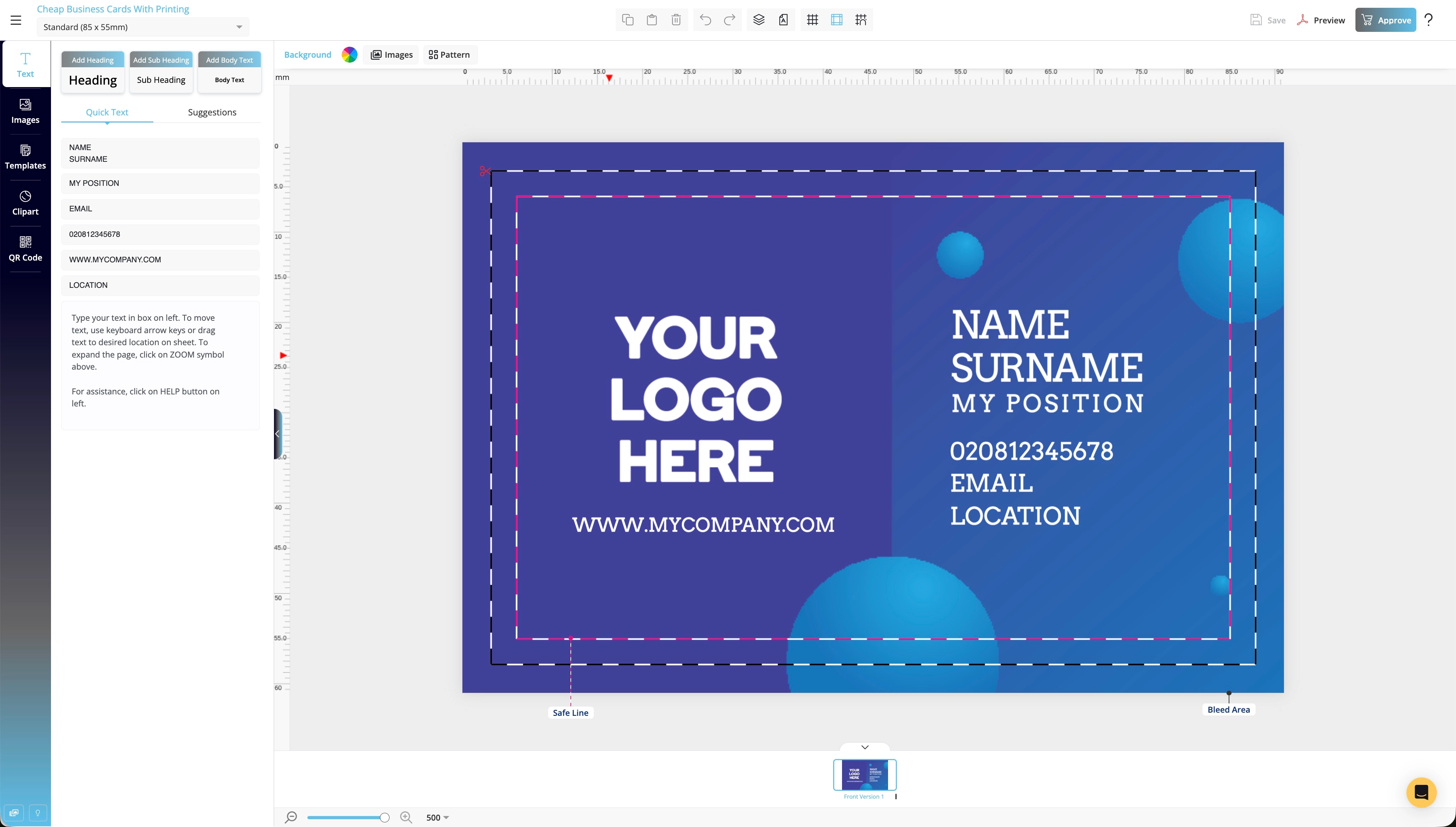
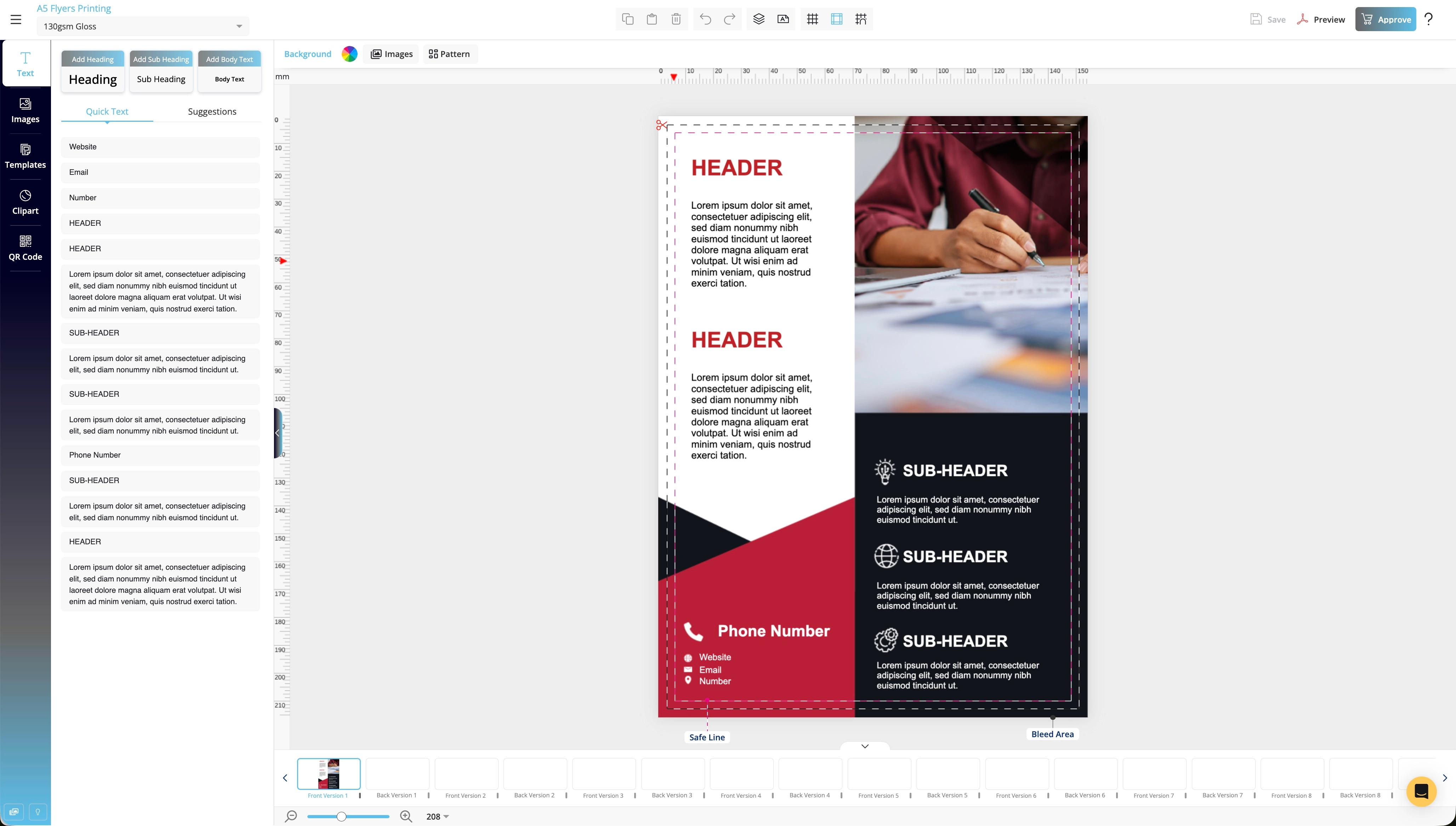
No Illustrator. No Photoshop. No head-scratching. Our free Designer Studio has everything you need: templates, fonts, shapes, and smart print guides, all built into one beautiful, browser-based tool. Just design, upload, and print.

Still not finding what you need? Talk to us.
Our team is made up of real humans who genuinely love print.
Drop us a message, give us a ring, or slide into our live chat.
We promise no bots and no scripts.
Go to Contact Page